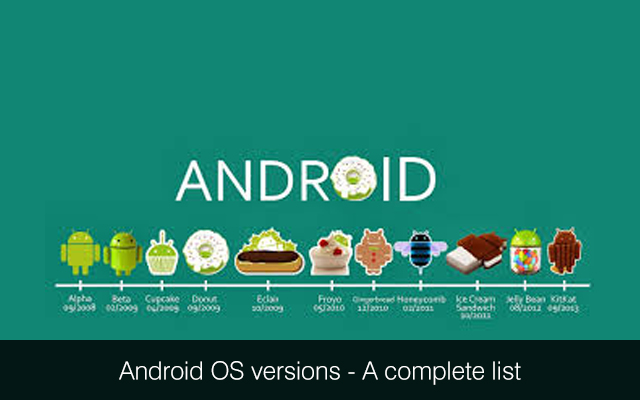
 According to an International Data Corporation press release, “Android will undoubtedly remain the clear market leader among smartphone operating systems with share expected to hit 80.2% in 2014.” The hugely popular Google mobile operating system was originally designed based on the Linux kernel for touch screen devices. But at present, Android is being used by wrist watches (Android Wear), televisions (Android TV), cars (Android Auto) and other specialized interfaces along with smartphones, tablets and phablets. The huge popularity of the mobile operating system can be attributed to a variety of factors. But each version of Android contributed towards enhancing its popularity and global market share. Each version of the mobile operating system interestingly has a dessert-based nickname.About Major Commercial Versions of Android Cupcake (Android 1.5): Android 1.5 SDK was releases in April 2009. Cupcake considered beginning the era of the modern Android phone. It was also the first revamped version of the mobile OS that came with many UI changes. The version 1.5 also supported widgets and folders on the home screen. At the same time, Cupcake also included camcorder support, improved Bluetooth support, and upload services like Picasa and YouTube. Donut (Android 1.6): In September 2009, Donut was released. It was built based on the features of Android 1.5, while expanding the features. Some of the behind the scene improvements were not even noticeable by end users. But it allows users to initiate universal search and access the Android Market. At the same time, Donut also supported improved camera, galleries, and higher resolution touchscreens. Donut is considered to provide the framework base for future updates. Eclair (Android 2.0/2.01/2.1): Éclair, released in late 2009, is considered to be major step up over earlier versions. The Android 2.0 came with a new user interface (UI), an improved web browser and Google Maps. Google Maps enable the platform to compete with other stand-along GPS navigation systems. Google further updated Éclair with additional features and bug fixes. Froyo (Android 2.2): Google announced Froyo in May 2010 at the Google IO Conference. The Android 2.2 came with a Just-In-Time (JIT) Compiler to drastically improve the processing power of devices. Froyo further supported Adobe Flash 10.1. So the users now have option to access their Flash-based content and games on the mobile web browser. Froyo also supported tethering to enable users to provide internet connectivity to any device from their Android smartphone's data connection. Gingerbread (Android 2.3): Gingerbread was released in December 2010 with several UI improvements and support for new technologies. The UI improvements to Android resulted in making the menus, dialogs and notification bars feel consistent. At the same time, Gingerbread also supported innovative technologies like Near Field Communication (NFC) and Internet Calling (SIP). Android 2.3 also came with an optimized JIT compiler and battery life. Honeycomb (Android 3.X): Honeycomb was the first Android version that was designed for tablets. IT was released in February 2011 with a set of new elements for tablets. Along with the new recent apps button, Honeycomb also came with the updated Gmail and Talk apps. The Talk app makes it easier for tablet users to video chat. Honeycomb was released under Google’s new distribution method. The distribution method required the device manufacturers to get their hardware choices approved by Google to obtain the required source code and license. Ice Cream Sandwich (Android 4.0): Google released Android 4.0 in December 2011. Ice Cream Sandwich was designed to bring some of the design elements of Honeycomb to smartphones, while refining the user experience. However, Google subsequently updated Android 4.0 for both smartphones and tablets. Jelly Bean (Android 4.1-4.3): Jelly Bean was released by Google in 2012. Google also releases Android versions 4.1, 4.2 and 4.3 within a shorter span of time. It included the polished UI design along with several new features. Jelly Bean is also the first version of Android that came with lock screen widgets, actionable notifications, multi-user accounts support and quick settings in the notification bar. The combination of customization options and useful services make Jelly Bean the turning point for the Google mobile operating system. Each updated version of Android comes with several additional and improvements. Google has unveiled the next version of the mobile operating system with the working title of Android L. But the formal version of Android L is expected to release by late 2014. If you are planning to hire service of Android development company India, you must evaluate them to see if they are sufficiently agile or not! We provide Android app programming services. If you would like to talk one of our certified Android app developers for hire, please get in touch with us at Mindfire Solutions.
 Among so many CMS or Content Management Systems that are available, WordPress is considered to be the most the adored as well as the preferred one. There are a number of reasons behind it. Let us discuss the features that have made WordPress the most accepted CMS.Firstly, it is considered to be one of the most powerful semantic platforms that facilitate publishing of content – irrespective of volume. Secondly, it comes up with a series of value added features that are specifically designed to make the end users experience as pleasant, as friendly, as well as, as smooth as possible as a publisher. Let us discuss the features that make this particular CMS so much popular. Updated as well as Improved Post Editor WP comes up with TinyMCE, which is a software that powers its visual editor. The latest version of WP comes up with an updated version of this Post Editor by the virtue of which, the interface looks much cleaner, as well as less cluttered or clumsy than in was in the previous versions. The customary “Paste from Word” button is missing as it is not required anymore, because pasting a text from the MS Word does not leave the users with a messy cluster of words any more that needs to be rearranged or edited afresh. There are options to preview the galleries from the editor. All the users need to do is to upload the images and then follow it up by inserting a gallery for checking them out. Drag and Drop option of Images WP also comes up with a unique feature that allows the users to drag as well as drop images into the Post Editor. For that the users do not have to click on the “Add Media” tab. As soon as an image is dragged into the post editor, the media uploader automatically pops up to let the users add a caption, ascertain the size of the image etc. Live Widget Preview The new version of WordPress provides the option of editing and previewing the Widgets instantly from the Customizer Screen. Therefore, there is no need to continuously save the widgets and refresh the sites to have a look at every change – small or big, that has been done on the front end, before saving or publishing the settings. Then there is the updated Customizer feature that helps the users to upload, crop as well as manage the header images. Editing the Images When it comes to editing the images, WordPress comes up with a handful of options that help adding as well as editing of images in a seamless way. It also helps in cropping and editing the images even when a post is being written. The users also can crop a photo into the post editor by clicking on the photo in question, and resizing it by dragging the handles to the edges. Even while editing the images, an edit image screen comes up in modal form. Hence, the user does not have to go to the Edit Image page separately – the fact that saves time, besides making the process much simpler. Theme Installer The 3.8 version of WP comes in a much improved form with the Theme Installer feature that makes it easier, smoother, as well as simpler for the users to browse through various themes that they are looking forward to preview and then install. It also provides the option of tracking the site statistics if and when needed, and also allows the users to customize their designs to meet their needs or objectives without any effort whatsoever. WordPress also helps creating as well as reading various kinds of mobile apps for devices like iPhone, Android, iPad and Blackberry. The feature is specifically designed as well as developed for publishing and sharing content, thereby luring the readers to visit a site. The CMS also has certain qualities with the help of which it ensures that the site in question is presented in an optimal format so that it appears at the top of the search engine pages, the moment the page is published and shared. This ensures maximum visibility – one of the reasons why WP is today the most cherish CMS. To get maximum benefits of Wordpress, you may consider hiring services of a WordPress CMS development company. We provide Wordpress customization services. If you would like to discuss with a expert WordPress developers from our team, please get in touch with us at Mindfire Solutions.
 Are you planning to shift from the paper form of promotion to the mobile apps? You are on the right track. Businesses are increasingly becoming more aware of the importance of mobile marketing. Often the adoption of technology in business is a result of personal use of these technologies. This is especially evident from the prevalence of mobile app development for marketing. Consumers nowadays consist of people who are used to download apps in a jiffy, use them according to their own convenience or share photos at their own will. Their consumer grade technology expectations are slowly spilling over to the business arenas as well.If you are wondering whether mobile app marketing works for promoting business, then check out the following benefits for which this method is preferred: Increases workforce visibility: If your business is opting for mobile workforce then there are troubles tracing the real time workers on a daily or hourly basis. It is also difficult to track down their performances. People on outdoor jobs are not really easy to locate unless they return to their desks. But the cloud based mobile applications provide greater visibility for the workforce in various ways. One of their advantages is that they present greater accuracy. As a result there are fewer problems to deal with. The companies will also require lesser time to spend on tracking their employees and thus, divert their attention to more important tasks. Improved Sales Opportunities: One of the biggest reasons why businesses are prone to adopt mobile marketing apps is that with the popularity of the smartphones greater opportunities have opened up for shopping and other engagements. The interaction between customers and business representatives has grown immensely as a result. Moreover, since smartphones are commonly found in every pocket it has become easier to reach out to the customers through the handheld devices. All you got to do is include a push notification to remind the users about their old shopping carts and tempt them back to the shopping world. If you can offer a better seamless experience of login ids and billing information, it spells a better path to win over your consumers. Utilize GPS facility: It would be a real loss not to make use of the latest technologies that are at your behest. The GPS facility is one of them. If you are planning to develop a cloud based mobile app to meet your marketing demands then it can also significantly enhance the routing efficiency by tracking job sites, workers and more importantly customer locations. With the help of the GPS, the business owners can easily see the map routes and even calculate time and date. Once you have been able to track the routes probably, it can save you a headache regarding fuel and wear and tear of your vehicles. Aid in improving quality control: These apps are also helpful in carrying out quality control checks and safety inspections at the work sites. If you are still using the paper forms, there would be several discrepancies and insufficiencies. But with an activated GPS facility, the inspection processes will not suffer. You will be better armed to deal with the data provided to you and can also resort to multimedia (photos, videos) for more authentic reports. You can also make use of the date and time stamps. Gathering data is made easy: Using mobile app development for marketing can open up a whole wide world of data collecting opportunities for you. If you are still stuck in the physical world it is time to shift to the virtual one to track the move of your customers. This would definitely help you to formulate better business plans and generate revenues. On the other hand, certain applications, like, Salesforce or Dropbox, are effective tools for storing the collected data which can be shared across several verticals. With a mobile data sharing capability the employees can put in information anywhere, anytime. Technology, in every form, is a powerful tool but it should be handled carefully. Similar laws apply to mobile app development for marketing as well. If you can use a mobile app for marketing properly, then it will prove the best way to promote your business. You can hire developers from top mobile app development companies in India who can help you build mobile apps within allocated budgets and time schedules. We provide custom mobile application development services. If you would like to hire mobile app developers from us, we would be glad to assist you at Mindfire Solutions.
 When the Apple’s Worldwide Wide Developers Conference, many have been discussed and writing on Swift and iOS 8. Now, developers and non developers at various backgrounds will have the ability to reach a lot easier into iOS and OS X worlds.Without a doubt, the most awesome announcement for the iOS developers is definitely the Playground feature which will allow these people to test the code lines instantly. However Swift is actually a compiled language, the feature allows the code to be interpreted also delivered in the live preview in the Xcode IDE. It's going to save developers a number of problems and can enable them to produce much better projects within a short duration. Apple’s statement describes that nicely, “Playgrounds will make writing Swift code effective and simple. Type the line of code, then the results can be seen instantly”. Incase, for instance, the code runs from a loop, one would will have the ability to include the line in issue into the Timeline Assistant to view it progress. That will point out the source of performance issues through timing the executing the code. One could highlight variables in the graph, check each step of the process of drawing a view, or perhaps view an animated Sprite Kit scene. If you are improved the code within the playground, simply shift that code in the project. Try out with Swift code playground. One doesn't need to compile and run the whole project, the playground gives quick comments on the results of the coding experiments. Xcode reviews the code when that is typed in. As soon as you complete a statement or perhaps take a break from typing, Xcode shows the code results within a sidebar at the right side in the source editor window. When you change the code, results might temporarily gets changed from black into gray and Xcode recalculates them. If you make an error, Xcode shows an error sign in gutter. Click on the sign to view a description for the particular error. Once you fix or remove the error, Xcode re-displays the results of the valid code. To analyze the value for the variable apart from the result, type the variable in a different line. Xcode reviews the variable and shows the value on the results sidebar. Quick Look buttons turn up for the results which represent content meant for graphical display, including images and strings. The playground contains the regular source-code editing features of Xcode. For instance, the playground offers syntax correction, code completion, as well as syntax-aware fonts and text colors. Once you are pleased with the outcomes of the experiments, you may copy the code in the playground and then paste that to the source files of the iOS and OS X projects. Additionally Swift simply being far more easy for the developers, Playground will enable them to understand on the way. They could learn in the Playground - “The blend of highly formatted documentation along with playground that is interactive makes it simple to completely explore the API, modifying''. However with the run-as-you-type Playground the new feature, one would have never be amazed to observing a few simple bugs. But the very first among these, might not be a little one as it might even clear off the hard drive. That's what was stated by Steve T-S (@stroughtonsmith) on the Twitter, Playground isn't really sandboxed, hence entered code could do everything without hitting enter. Although we are pretty confident that Apple would certainly make the extra effort into this to prevent any issues. To get maximum benefits of mobile apps, you may consider hiring services of a certified iPhone software development company. We provide iPhone app development services. Companies hire iPhone consultant from us at Mindfire Solutions. If you are ready, please contact us today.
 A constant increase is noted in the number of enterprises relying on open source technologies to curtail project overheads. Normally, the copyright holder of the open source software allows other users to study, change and distribute it without paying any licensing fees. Many developers even contribute towards making the open source software better. However, it is always important for both individual developers and enterprises to keep track of the next big things in open source. If you are gathering information about the hot open source technologies, it is a good idea to have a look at some of the best open source application development tools.5 Application Development Tools: the "Next Big Things" in Open Source 1) Data-Driven Documents (D3) As a JavaScript, D3.js is designed with features for manipulation and virtualization of data-based documents. It enables developers to virtualize the data using HTML, CSS and SVG. Initially, the developers have to bind the arbitrary data to a Document Object Model (DOM). The data-driven transformations can be subsequently applied to the document. The web programmers can D3.js to present the data in an engaging and easy-to-understand way. For instance, they can use D3.js to present an array of numbers as a HTML table or interactive SVG bar chart. Along with being fast and flexible, D3.js also supports large datasets, and the dynamic behaviors required for interaction and animation. 2) Famo.us The open source JavaScript framework allows programmers to create smooth and complex UIs for a variety of screens. Famo.us is also the only JavaScript framework that comes with a 3D layout engine fully integrated with a 3D physics animation engine. The integration enables Famo.us to render DOM, Canvas or WebGL. The programmers also have option to create Famo.us applications and sites by using free tools. Further, they can integrate the JavaScript framework seamlessly with other frameworks like jQuery, Backbone, Angular and Cordova. Famo.us can also be used for both web application and mobile app development. 3) jQuery The jQuery Foundation aims to “support the advancement of web through JavaScript”. It allows developers to use both jQuery UI and jQuery Mobile. The jQuery UI is developed on the jQuery JavaScript Library. It includes widgets, effects, themes and user interface interactions. The web developers can use jQuery UI to accomplish both simple and complex tasks. On the other hand, jQuery Mobile is a designed as a HTML5-based user interface system. It helps developers in creating responsive websites and applications that can be accessible on both desktop and mobile devices. 4) Atom The developers have described Atom as “a hackable text editor for the 21st Century”. The open source desktop editor is developed based on web technologies. But it includes a set of innovative tools that can be used to customize anything. The programmers can start using Atom immediately without putting any time or effort for configuration. At the same time, Atom also comes with the features provided by other modern text editors including code folding, snippets, file system browser, a clean preferences UI, multiple cursors and pans, and fast project-wide search and replace. 5) Brackets The open source code editor is launched by Adobe. Brackets comes with the features required by front-end developers and web designers. Adobe has designed Brackets as an optimized tool to edit code written in open source technologies like HTML, JavaScript and CSS. Brackets further allow developers to use an extension manager, with extensions for some commonly used programming languages. The programmers can further enjoy live HTML development and efficient JavaScript debugging. You must experiment with the latest open source application development tools to save both time and effort. But while evaluating the next best things in open source, you must keep in mind the specific requirements of your projects. You must compare different open source tools to complete the project within the shortest time frame. To get maximum benefits of Open-source, you may consider hiring services of a WordPress development company. We provide Wordpress website development services. If you would like to discuss with a expert WordPress developers from our team, please get in touch with us at Mindfire Solutions.
 In August, Parse, a company acquired by Facebook last year, released the Parse PHP SDK. It is the first SDK released by Parse for any server-side scripting language. The SDK enables developers to create PHP scripts and websites within a shorter span of time. The PHP developers can use the SDK provided by Parse to accomplish a wide range of tasks including tracking analytics, sending push notifications, storing data and managing users. Further, they can accomplish these important tasks without writing longer lines of code. The code can be integrated seamlessly with both new and existing PHP applications. According to official Parse Blog, “This is our first SDK for a server-side language, and the first to be truly open-source. PHP is an incredibly popular programming language and has consistently been in the top 10 on the TIOBE index for the past 15 years. Some metrics report that it is still serving the vast majority of websites on the internet. Until now, if you wanted to access Parse from PHP, the REST API was the only option. A few Parse API wrapper libraries have been released by third parties on GitHub. While we think this is awesome, many developers requested better PHP support and we decided to build a first-party SDK.” Important Facts about Parse PHP SDK Each Beginner Needs to Know Open Source Each programmer wants to adopt a new technology without increasing the project overheads. Parse has released the source of PHP SDK as open source. So the Parse PHP SDK can be used by PHP developers without paying any licensing fees. Further, they can avail the assistance of other users, and contribute to improve the open source SDK. Requires Minimum Configuration Despite allowing PHP developers to accomplish several complex tasks without writing lengthy code, the Parse PHP SDK does not require any robust configuration. Parse has designed the SDK to help PHP developers to create large and complex application rapidly with minimum configuration. The programmers can simply download the SDK, and use it quickly to build PHP applications on Parse. Manages Entire Backend While creating PHP applications on Parse, the programmers have option to avail the advantages of Parse Cloud. Parse Cloud is designed with features to efficiently handle the entire backend of the application. So the programmers are not required to focus on scalability, performance and databases. Thus, they have more time to focus on the features and functionality of the web application to make it deliver richer user experience. Allows Saving Data Flexibly Parse has designed the PHP SDK with features to make it easier for developers to work with native objects without writing longer lines of code. They can simply use the ParseObject to store a variety of data on Parse. The individual ParseObject further contains key-value pairs of JSON-compatible data. As the data is schemaless, the keys for each ParseObject need not be specified in advance. So it becomes easier for PHP programmers to save the data objects to the cloud flexibly through the SDK. Allows Deployment of Multiple Versions of the Same Application While creating PHP applications on Parse, the developers have option to create an App for individual applications. They can further apply the distinct application id and REST API key of the App to their web application. Thus, they can accommodate multiple Apps in a single account on Parse. The option helps them in deploying different versions of the same application to optimize both production and testing. On the whole, Parse PHP SDK is designed by keeping in mind the latest trends in web application development. The programmers can use it to rapidly create complex application without writing lengthy code and requiring robust configurations. Further, the open source SDK allows developers to focus on making the application deliver richer user experience by handling the entire backend. This would help you leverage the benefits of PHP certified professionals when hiring services of a PHP web development company India. We provide PHP application development services. To hire PHP developers India from us, please reach out to us at Mindfire Solutions.
 Technology has developed in leaps and bounds in the recent years. Mobile development, too, has altered a lot since the days of its inception. With more number of technologies being introduced, the room for committing errors has increased as well. Developing a mobile application is no child’s play. There are several factors that need to be checked for its success. One error can ruin the application or even the entire brand. An app is meant for the users and it is important to ensure good user experience. Although developers check their products for finding out mistakes but there are certain common errors that are committed by several of them.Here’s a list of 7 mistakes that the developers need to avoid while developing a mobile application: 1. Mobile apps are a competitive business where the developers might be required to build for Google Play as well as Apple App Store. It is always advisable to build them on a single platform instead of the multiple ones. This also aids in achieving minimum viable product from the app store quickly. If the app is developed on two platforms and require changes, then the modifications will have to be done on both the platforms. This will lead to additional costing and time. It is better, however, to finalize the app on iOS before porting it to Android. 2. Keep two things in mind before you develop the application – consumers as well as marketing. Thus, it is significant to decide the category in which you want to introduce the app. With so much competition in this market, it is essential that your product gets noticed. 3. User experience is another criterion to keep in mind while dealing with mobile apps. The mobile users just do not put up with applications that offer bad user experience. You cannot afford to compromise this whilst developing an app for the handheld devices. 4. Once you have selected a platform to launch your application it is essential that you have a set of features for the MVP. In the first version, you would like to see how the users are responding to the app. If you already own a good website do not plan to condense it into a mobile format. Think afresh and develop a separate plan solely focused on the mobile user experience. Do not rush during the development process and launch a product that has bugs. Instead of opting for a rocky start, go slow with your process and launch an app that is 100% bug free. Mobile users are more than often quite unforgiving when it comes to mistakes. 5. Do not commit the error of launching a mobile application without putting it on the analytics. A tracking tool like, Flurry, can be used to decide on issues, such as, content, design and user experience. 6. It is vital to market the product before submitting them. Take a look at the marketing strategies of some of the biggest brands in the mobile world. All of them keep advertising about their app development right from the planning stage. This is an important marketing strategy to reach out to the users. Release images and required tidbits for the users to relate. 7. Many of the most popular apps are for free. Hence, monetization is one thing about which you will have to plan carefully from the very beginning. A number of companies mismanage their projects by not hiring professionals. This is a very wrong step as the developers are the key factors in developing an app. To ensure that it can be launched successfully, the best option is to indulge in proper market research, plan effective monetization strategy, and ensure there is suitable collaboration between designers and developers. You can hire developers from top mobile app development companies in India who can help you build mobile apps within allocated budgets and time schedules. We provide mobile app development services. If you would like to hire mobile app developers from us, we would be glad to assist you at Mindfire Solutions.
